

- Details
- Category: Blog
- Hits: 523
New release of 61850 Avenue toolset - extended ACSE certificate authentication, integrated tools and certificate validation
We are pleased to announce the release of version 2.1.20 of the 61850 Avenue toolset. This update extends ACSE certificate authentication with new server-certificate verification parameters and verification during connection establishment. It also introduces security configuration validation, easier access to the applications included in the toolset, improved log and clipboard support, and a range of usability and stability enhancements for configuring, managing and testing IEC 61850-based systems.
61850 Avenue client main improvements include:
- Extended ACSE certificate authentication: The Authentication section of a server profile now includes additional parameters for certificate-based ACSE authentication:
- Certificate Server Name,
- Certificate CA Chain,
- Certificate CRL Chain.
When a connection is established using the ACSE certificate mechanism, Avenue uses these settings to verify the server authentication certificate, including its certificate chain, revocation status, server name, signature and authentication time. The implementation also protects against repeated authentication timestamps. Certificate-specific parameters are available when Mechanism Name is set to 1.0.840.0.1.0.1.1 (Certificate). Together with the authentication certificate, private key and private-key passphrase settings, the new parameters provide a complete configuration for certificate-based ACSE authentication and server verification.
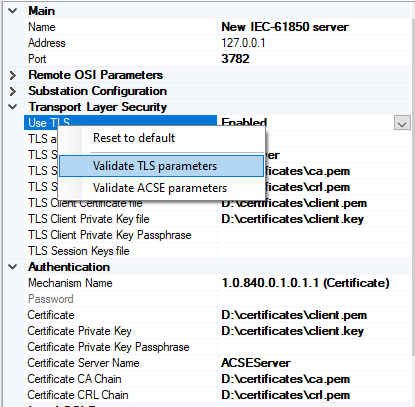
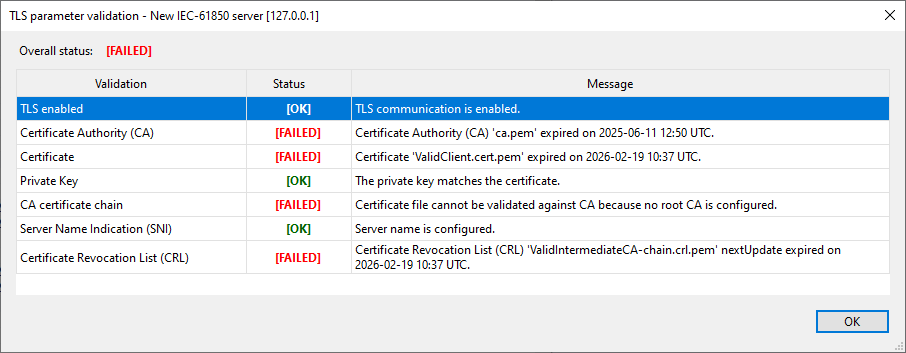
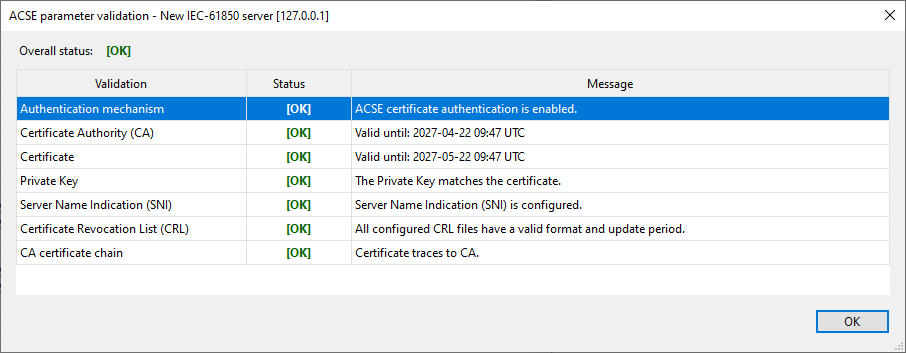
- TLS and ACSE parameter validation: 61850 Avenue can also validate TLS and certificate-based ACSE authentication parameters before a connection is attempted. The Validate TLS parameters and Validate ACSE parameters commands check the currently configured profile locally, without establishing a connection to the server. Validation covers the configured certificates, private keys, CA chains, server names and Certificate Revocation Lists (CRLs), and presents the results in a clear table. Each validation step is reported with either OK, WARNING, FAILED or DISABLED status, helping users identify missing, invalid or inactive settings before starting communication with an IEC 61850 server. Validation results can also be selected and copied for further analysis or inclusion in the test documentation. The overall result reflects all required checks. For example, a certificate may be valid while the CA chain still fails because no trusted root CA is configured - in such a case, the overall result remains FAILED until the trust-chain configuration is corrected.
 |
 |
|
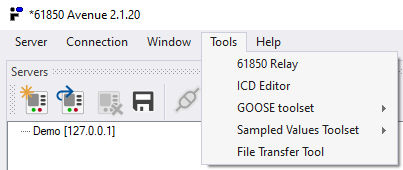
- Direct access to the Avenue toolset: A new Tools menu provides direct access to the companion applications installed with the 61850 Avenue toolset:
- IEC 61850 Relay Simulator,
- IEC 61850 ICD Editor,
- GOOSE Sender and GOOSE Receiver,
- SAV Sender and SAV Receiver,
- File Transfer Tool.
This makes it easier to move between client-server testing, IED simulation, SCL configuration, GOOSE and Sampled Values testing, and IEC 61850 file services from a single starting point. If a selected tool is unavailable or cannot be started, Avenue informs the user about the problem.
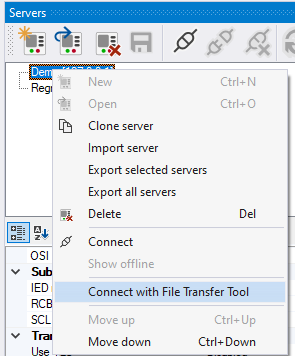
- File Transfer Tool integration with server profiles: The server profile context menu now includes Connect with File Transfer Tool. The command starts File Transfer Tool and passes the address of the selected server profile automatically, eliminating the need to enter the server address again when switching from IEC 61850 client testing to file-service testing.
- Improved Log view and clipboard support: The Log view has been updated to display complete multi-line messages without truncation. Selected log entries can now be copied in a format suitable for pasting into office applications such as Microsoft Word and Excel. Columns and line breaks are preserved, making it easier to prepare test reports, analyze communication sequences and share diagnostic information. Keyboard operations are also supported: Ctrl+C copies selected entries and Ctrl+A selects all log entries.
- Easier file path handling: File path parameters now provide a dedicated X action for clearing the current value. When a path has already been configured, the corresponding file dialog opens in that location and preselects the current file name. These improvements reduce repetitive navigation when configuring SCL files, certificates, keys, CRLs, session-key logs and SCL export destinations.
Additional features and fixes of 61850 Avenue client:
-
Added support for 20-bit time precision.
-
Improved keyboard navigation and menu access-key visibility.
-
Improved copying of Server Explorer object attributes and references.
-
Corrected object selection behavior in Server Explorer.
-
Improved focus, row sizing and automatic scrolling in the Log view.
-
Prevented tracking data from being included in exported SCL files.
-
Improved consistency of fonts and message presentation.
61850 ICD Editor:
- Improved RCB indexing: Fixed issues affecting RCB indexing.
- Enhanced GCB/MSVCB editing: Corrected SV and GOID parameter editing in GCB/MSVCB configurations.
Sampled Values Toolset:
- Expanded signal support: Added support for up to 24 signals across three measurement points.
- Extended SV message decoding: Added decoding support for optional SV message elements.
- Improved data visualization: Added visualization of optional SV fields.
- Enhanced stream detection: Added stream type information to the Detect view.
- More precise message timing: Moved message transmission to a separate high-priority thread to ensure more accurate delays between messages.
This release reflects our commitment to the continuous improvement of the 61850 Avenue toolset, addressing users feedback and following the evolving standards. Welcome to learn the details of the new release of the 61850 Avenue toolset.
INFO TECH testing and simulation tools for the IEC 61850 standard based communication are already licensed to approx. 130 companies and research institutions from 5 continents.
| Download trial versions |
|
'INFO TECH' Dr Wojciech E. Kozlowski sp.j. Edisona 14 |
+48 58 3018527 |